
Note: This article only applies to customers using our Managed Wordpress Backups service
Backups are automatically deleted based on your backup rotation/retention settings but if you need to manually delete any backups to free up some disk space, follow the steps below.
1. Log into your Wordpress website and click on the Backuply link in the left side navigation bar. This will take you to the Backuply dashboard.
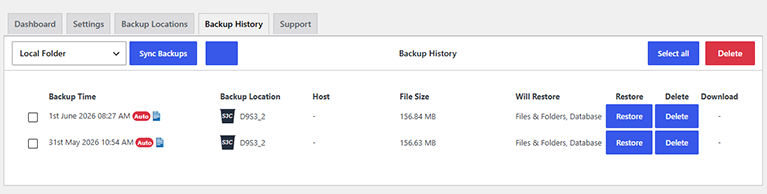
2. Click on the "Backup History" tab and you will see a list of all available backups. You can delete individual backups by clicking on the "Delete" button next to the backup. You can also delete multiple backups at a time by selecting the checkbox next to the backups you wish to delete, and then click on the red "Delete" button toward the top of the page.
 .
.
As this service is fully managed we can also take a manual backup for you. Simply submit a ticket to the Managed Wordpress Backups support department and let us know that you would like us to take a manual backup for you.