
Note: This article only applies to customers using our Managed Wordpress Backups service
Whilst our Managed Wordpress Backup service automatically backs up your website at set intervals, it is sometimes useful to take a manual backup of your website (before making any major changes or updates, for example). To take a manual backup, follow the steps below.
1. Log into your Wordpress website and click on the Backuply link in the left side navigation bar. This will take you to the Backuply dashboard.
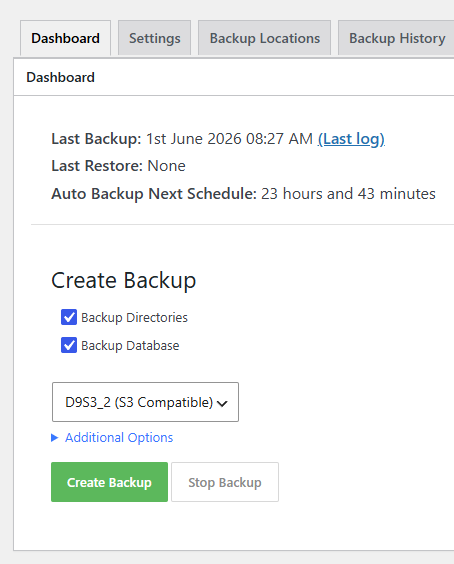
2. Scroll down to the "Create Backup" heading. Make sure you select both the "Backup Directories" and "Backup Database" check boxes and ensure that the D9 S3 Storage location is selected from the drop down box (it should be selected by default). Click on the green "Create Backup" button to manually take a backup of your Wordpress install.
 .
.
As this service is fully managed we can also take a manual backup for you. Simply submit a ticket to the Managed Wordpress Backups support department and let us know that you would like us to take a manual backup for you.